Frontend
Turf.js로 폴리곤 공간 연산 수행하기
Turf.js로 폴리곤 공간 연산 수행하기
개요
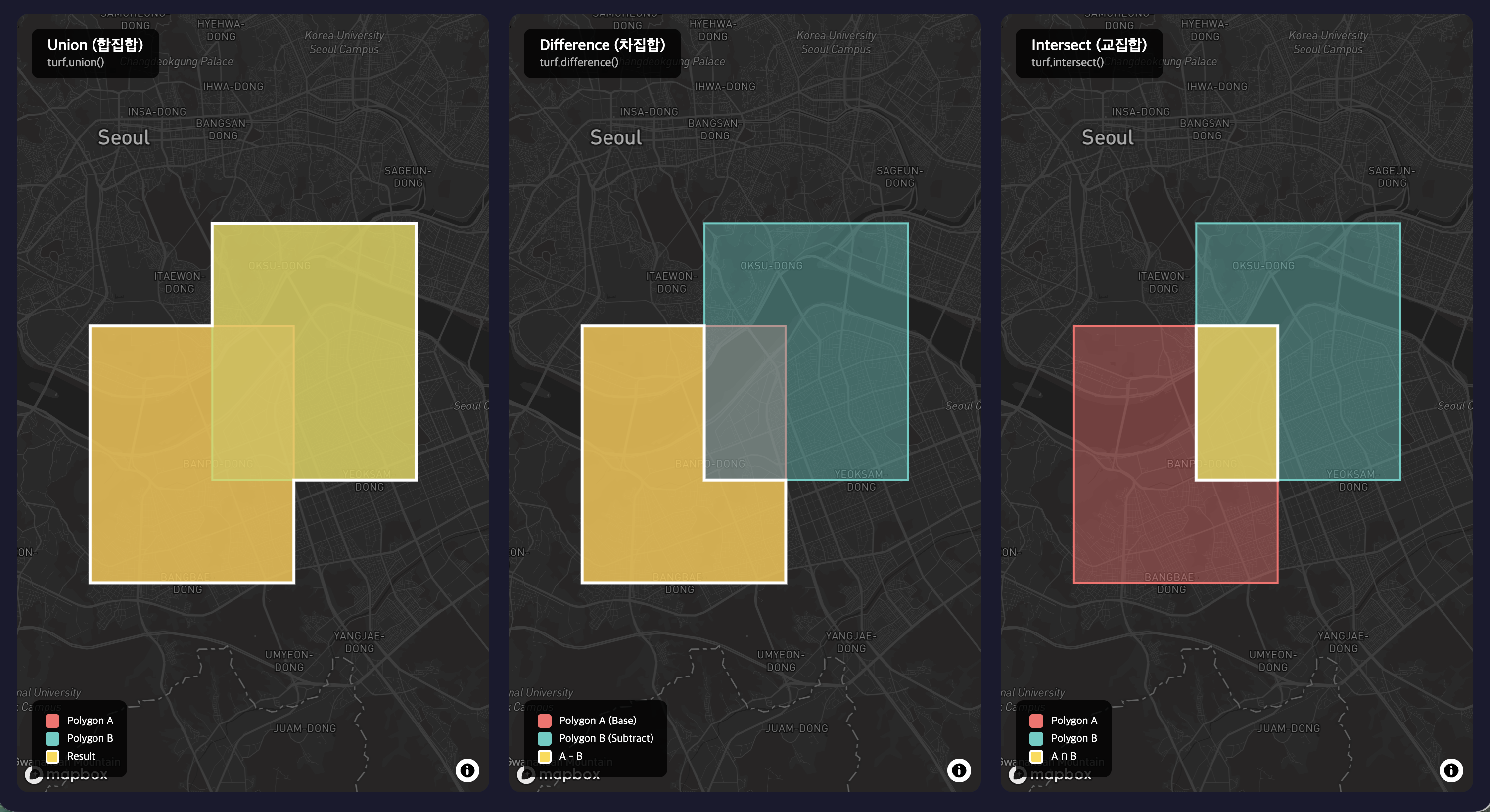
Turf.js는 브라우저와 Node.js에서 실행되는 GeoJSON 기반 공간 분석 라이브러리입니다. v7부터 polygon-clipping 엔진으로 성능과 정확도가 크게 개선되었습니다.
설치
# 전체 라이브러리
npm install @turf/turf

# 또는 개별 모듈
npm install @turf/union @turf/difference @turf/intersect @turf/helpers
기본 데이터 생성
폴리곤 생성
import { polygon, multiPolygon, featureCollection } from '@turf/helpers';

// 단일 폴리곤
const poly1 = polygon([
    [[0, 0], [2, 0], [2, 2], [0, 2], [0, 0]]
]);

const poly2 = polygon([
    [[1, 1], [3, 1], [3, 3], [1, 3], [1, 1]]
]);

// 멀티폴리곤
const multiPoly = multiPolygon([
    [[[0, 0], [1, 0], [1, 1], [0, 1], [0, 0]]],
    [[[2, 2], [3, 2], [3, 3], [2, 3], [2, 2]]]
]);
합집합 (Union)
여러 폴리곤을 하나로 병합합니다.
import { union } from '@turf/union';
import { featureCollection } from '@turf/helpers';

// v7: FeatureCollection 입력
const merged = union(featureCollection([poly1, poly2]));
// 결과: Polygon 또는 MultiPolygon (연결되지 않으면)
여러 폴리곤 병합
import { union } from '@turf/union';
import { featureCollection } from '@turf/helpers';

const polygons = [poly1, poly2, poly3, poly4];
const merged = union(featureCollection(polygons));
실용 예: 행정구역 병합
// 경기도 시군구 → 경기도 전체 영역
const gyeonggiCities = featureCollection([
    suwonPolygon,
    seongnamPolygon,
    yonginPolygon,
    // ...
]);

const gyeonggiProvince = union(gyeonggiCities);
차집합 (Difference)
기준 폴리곤에서 다른 폴리곤 영역을 제거합니다.
import { difference } from '@turf/difference';
import { featureCollection } from '@turf/helpers';

// poly1에서 poly2 영역 제거
const subtracted = difference(featureCollection([poly1, poly2]));
// 결과: Polygon, MultiPolygon, 또는 null (완전히 덮이면)
여러 영역 제거
// base에서 exclude1, exclude2 영역 모두 제거
const result = difference(featureCollection([base, exclude1, exclude2]));
실용 예: 특정 구역 제외
// 서울시 전체에서 한강 영역 제외
const seoulLandOnly = difference(featureCollection([
    seoulBoundary,
    hanRiverPolygon
]));
교집합 (Intersect)
폴리곤들의 겹치는 영역만 추출합니다.
import { intersect } from '@turf/intersect';
import { featureCollection } from '@turf/helpers';

const intersection = intersect(featureCollection([poly1, poly2]));
// 결과: Polygon, MultiPolygon, 또는 null (겹치지 않으면)
실용 예: 서비스 가능 영역
// 배달 가능 영역과 사용자 위치 주변 영역의 교집합
const deliverableArea = intersect(featureCollection([
    restaurantDeliveryZone,
    userRadiusCircle
]));

if (deliverableArea) {
    console.log('배달 가능한 영역 존재');
} else {
    console.log('배달 불가');
}
연산 결과 검증
Null 처리
교집합이나 차집합 결과가 없을 수 있습니다:
const result = intersect(featureCollection([polyA, polyB]));

if (result === null) {
    console.log('겹치는 영역 없음');
    return;
}

// 결과 사용
console.log(result.geometry.type); // 'Polygon' or 'MultiPolygon'
면적 검증
import { area } from '@turf/area';

const merged = union(featureCollection(polygons));
const areaM2 = area(merged);
console.log(`면적: ${(areaM2 / 1000000).toFixed(2)} km²`);
복합 연산 예시
도넛 폴리곤 생성
import { difference } from '@turf/difference';
import { circle } from '@turf/circle';
import { featureCollection } from '@turf/helpers';

// 외부 원 (반경 5km)
const outer = circle([127.0, 37.5], 5, { units: 'kilometers' });

// 내부 원 (반경 2km)
const inner = circle([127.0, 37.5], 2, { units: 'kilometers' });

// 도넛 형태
const donut = difference(featureCollection([outer, inner]));
여러 조건 조합
import { union, difference, intersect } from '@turf/turf';
import { featureCollection } from '@turf/helpers';

// 1. 모든 서비스 지역 병합
const allServiceAreas = union(featureCollection(servicePolygons));

// 2. 금지 구역 제거
const allowedAreas = difference(featureCollection([
    allServiceAreas,
    ...restrictedZones
]));

// 3. 사용자 반경과 교차
const finalServiceable = intersect(featureCollection([
    allowedAreas,
    userRadiusPolygon
]));
성능 고려사항
복잡한 폴리곤
import { simplify } from '@turf/simplify';

// 연산 전 폴리곤 단순화 (정점 수 감소)
const simplified = simplify(complexPolygon, { tolerance: 0.001 });
const result = union(featureCollection([simplified, otherPolygon]));
유효성 검사
import { kinks } from '@turf/kinks';

// 자기 교차 검사
const selfIntersections = kinks(polygon);
if (selfIntersections.features.length > 0) {
    console.warn('자기 교차하는 폴리곤');
}
API 정리
| 함수 | 입력 | 출력 | 설명 |
|---|---|---|---|
union | FeatureCollection | Polygon/MultiPolygon | 모든 폴리곤 병합 |
difference | FeatureCollection | Polygon/MultiPolygon/null | 첫 번째에서 나머지 제거 |
intersect | FeatureCollection | Polygon/MultiPolygon/null | 공통 영역 추출 |
모범 사례
- FeatureCollection 사용: v7부터 여러 폴리곤은 FeatureCollection으로 전달
- Null 체크 필수: 교집합/차집합 결과가 없을 수 있음
- 단순화 먼저: 복잡한 폴리곤은
simplify후 연산 - 좌표계 통일: 모든 입력은 동일한 SRID (보통 4326)